


Quilt Assistant


| Free software for designing quilts based on photos and drawing pieced quilt blocks with ease. Check out the tutorials to learn how to use this software. |
What is Quilt Assistant?
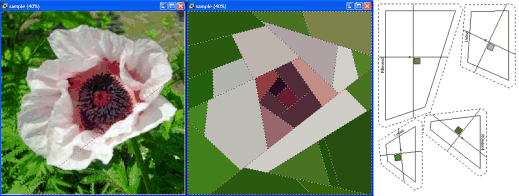
QuiltAssistant is free design-software that can help you to turn your photos into quilts. Rather than the traditional approach of breaking up the photo into little squares ('watercolor style') it allows you to divide the photo into pieces of arbitrary size and shape.
On completing your design, you can print templates including seam allowances.
A picture is worth a thousand words:
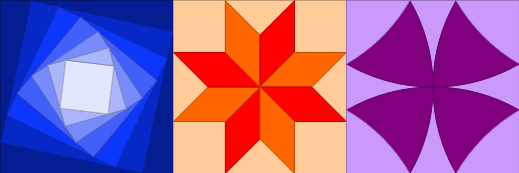
But Wait, There's More! You can also use QuiltAssistant to quickly draft more traditional quilt blocks not based on any particular image. The software helps you by making use of the symmetry present in most blocks: for every line you draw, the software can automatically complete the symmetrical parts of the design for you:
You can also use QuiltAssistant to make your own paper piecing patterns, and even export your quilt and block designs to Electric Quilt!
What Quilt Assistant is NOT
QuiltAssistant is not designed to be a cheap alternative to commercial software like Electric Quilt or Quilt-Pro. It is not geared toward the design of complete block-based quilts, nor does it have libraries of blocks or fabrics to play with. Instead, it focuses on specific tasks like turning photos into quilts and quickly drafting quilt blocks or pacer piecing patterns.
I want to know more
To learn more about QuiltAssistant, please read the QuiltAssistant manual (PDF, you need Acrobat Reader). It will quickly bring you up to speed on the way the software can work for you. A sample printout shows you what the templates printed from QuiltAssistant can look like.
Also, make sure to check out the tutorials to get step by step instructions that teach you about different aspects of the software.
Examples
Here are a couple of quilts I designed using QuiltAssistant:
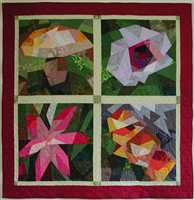 Flora & Fungi |
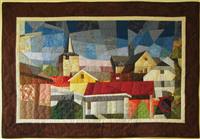 Schin op Geul |
 Doyenna |
Download
 Download QuiltAssistant v2.25 (2.7 Mb, release date 29 April 2013) for Windows.
Be aware that you need the Microsoft .NET Framework to run this program. This framework may already be installed on your computer (Windows Vista, 7 and higher come preinstalled with it). If not, you will be warned when you install QuiltAssistant.
Tutorials, Questions, Feedback
 Look at the Quilt Assistant tutorials to get you started. If you have any questions or comments, want to find answers to frequently asked questions (FAQ), or you want to share your experiences, please visit the
Quilt Assistant forum. Alternatively, you can
send me a private message.
Look at the Quilt Assistant tutorials to get you started. If you have any questions or comments, want to find answers to frequently asked questions (FAQ), or you want to share your experiences, please visit the
Quilt Assistant forum. Alternatively, you can
send me a private message.
What's New?
Since v2.24 (4 December 2012):
- Bugfixes based on user reports (mostly related to paper piecing and naming)
Since v2.23 (6 September 2011):
- Bugfix scrolling / zooming for maximized windows in Windows 7 and up
- Added support for Windows 8
Since v2.22 (24 December 2009):
- Bugfix numbering in printout
- Bugfix in the naming for paper piece logic
For a list of all improvements since the beginning, see the complete revision history.